Regulations
21 CFR Part 11, clause by clause
Part 11 sets FDA's rules for electronic records and electronic signatures. Here is each requirement that applies to this system, quoted from the eCFR, with what the software does and what your procedures cover.
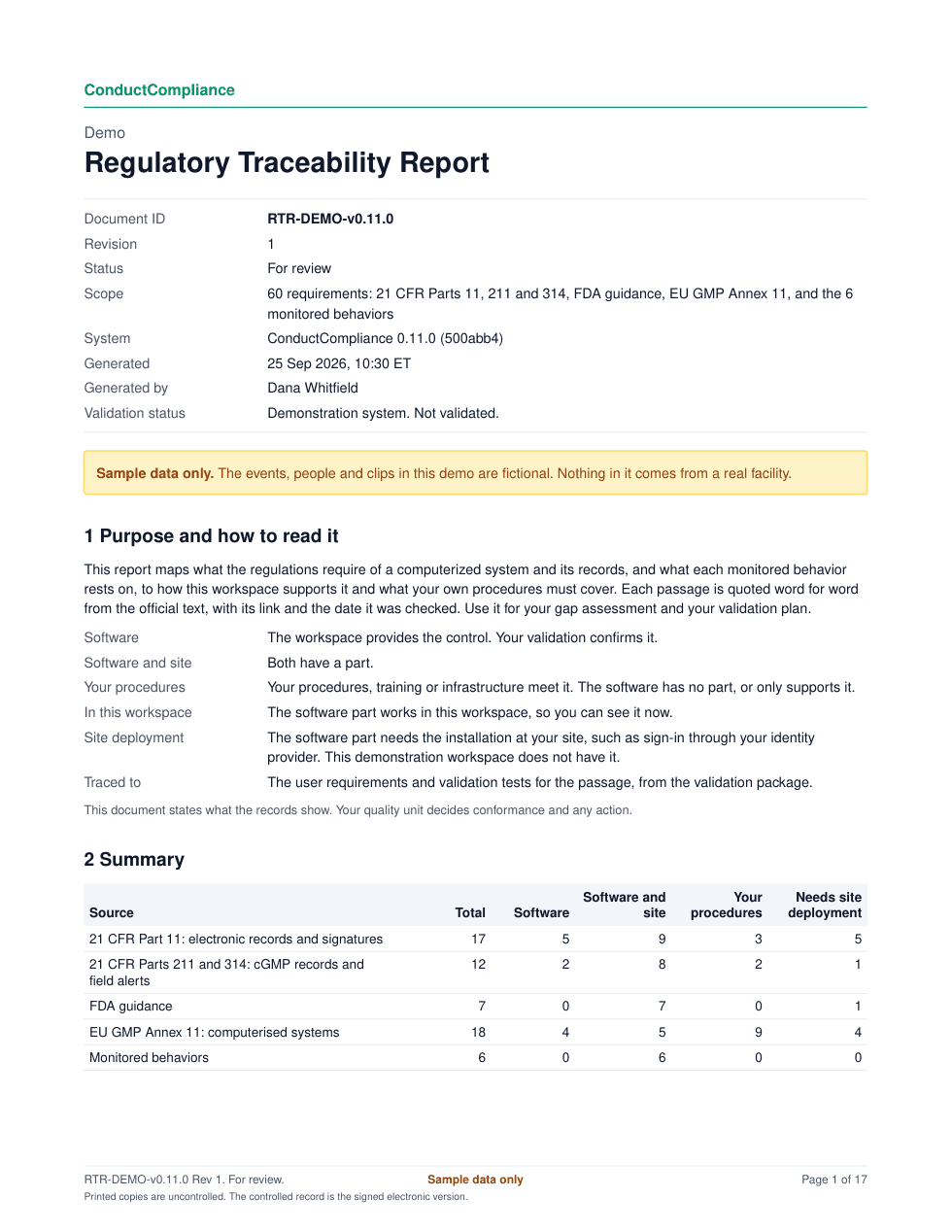
How to read it
Who meets each requirement
- Software
- The workspace provides the control. Your validation confirms it.
- Software and site
- Both the software and your procedures have a part.
- Your procedures
- Your procedures, training or infrastructure meet it. The software has no part, or only supports it.
- Site deployment
- The software part needs the installation at your site, such as sign-in through your identity provider.
- met by the software
- 5
- shared by the software and your procedures
- 9
- met by your procedures
- 3
- need the installation at your site
- 5
The clauses
17 Part 11 requirements, quoted
21 CFR 11.10(a): Validation
Software and site“Validation of systems to ensure accuracy, reliability, consistent intended performance, and the ability to discern invalid or altered records.”
Official textfor 21 CFR 11.10(a) (opens in a new tab)Checked 24 Sep 2026
- The software
- The validation package gives the user requirements, risk assessment, IQ, OQ and PQ scripts and traceability matrix, built from one system specification. Audit trail exports carry a SHA-256 hash chain, so an altered record can be detected.
- Your procedures
- Your validation team completes, approves and executes the package under your computerized system validation procedure, and approves the system for GMP use.
Validation: URS-07, URS-27; tests OQ-05, OQ-19, PQ-01
More: Validation package, Audit trail
21 CFR 11.10(b): Copies of records
Software“The ability to generate accurate and complete copies of records in both human readable and electronic form suitable for inspection, review, and copying by the agency.”
Official textfor 21 CFR 11.10(b) (opens in a new tab)Checked 24 Sep 2026
- The software
- Every report, event record, case list and audit trail downloads as PDF, and the tables as unlocked XLSX and CSV with field definitions and code lists.
- Your procedures
- Name who produces copies for FDA, and how.
Validation: URS-12, URS-18, URS-19, URS-20; tests OQ-09, OQ-12, OQ-13, OQ-14, PQ-02
21 CFR 11.10(c): Protection and retrieval
Software and siteSite deployment“Protection of records to enable their accurate and ready retrieval throughout the records retention period.”
Official textfor 21 CFR 11.10(c) (opens in a new tab)Checked 24 Sep 2026
- The software
- Records are kept as structured data, and any report can be produced again from them for the retention period.
- Your procedures
- Set the retention period, and back up, restore-test and archive the records.
Validation: URS-24; tests IQ-04, PQ-03
More: Electronic signatures
21 CFR 11.10(e): Audit trail
Software“Use of secure, computer-generated, time-stamped audit trails to independently record the date and time of operator entries and actions that create, modify, or delete electronic records. Record changes shall not obscure previously recorded information.”
Official textfor 21 CFR 11.10(e) (opens in a new tab)Checked 24 Sep 2026
- The software
- Every decision records the person, role, date, time and reason. A later decision never overwrites an earlier one, and every export carries the hash chain.
- Your procedures
- Review the audit trail with the records it covers, at the frequency your risk assessment sets.
Validation: URS-03, URS-06, URS-23; tests IQ-03, OQ-02, OQ-04, OQ-17, PQ-02
More: Audit trail, Validation package
21 CFR 11.10(f): Sequence of steps
Software“Use of operational system checks to enforce permitted sequencing of steps and events, as appropriate.”
Official textfor 21 CFR 11.10(f) (opens in a new tab)Checked 24 Sep 2026
- The software
- The app enforces the order of steps: decisions only on waiting cases, one escalation per case, closing only an open escalation, sign-off only after the period ends with nothing waiting, and approval only after review by another person.
- Your procedures
- Confirm the sequence checks in validation.
Validation: URS-05, URS-13; tests OQ-03, OQ-09
21 CFR 11.10(g): Authority checks
Software and site“Use of authority checks to ensure that only authorized individuals can use the system, electronically sign a record, access the operation or computer system input or output device, alter a record, or perform the operation at hand.”
Official textfor 21 CFR 11.10(g) (opens in a new tab)Checked 24 Sep 2026
- The software
- One permissions table decides who decides cases, closes escalations, records field alert decisions and signs. The user access review prints the same table.
- Your procedures
- Grant roles under your access procedure, and review access periodically with the user access review.
Validation: URS-04, URS-14, URS-15; tests OQ-03, OQ-10, OQ-11
More: Validation package
21 CFR 11.10(h): Source of data
Software and site“Use of device (e.g., terminal) checks to determine, as appropriate, the validity of the source of data input or operational instruction.”
Official textfor 21 CFR 11.10(h) (opens in a new tab)Checked 24 Sep 2026
- The software
- Each case records the camera that produced it, and Site setup ties each camera to its view, area and monitoring computer.
- Your procedures
- Keep the camera and computer list current under change control.
Validation: URS-01; tests OQ-01, PQ-01
21 CFR 11.10(i): Training
Your procedures“Determination that persons who develop, maintain, or use electronic record/electronic signature systems have the education, training, and experience to perform their assigned tasks.”
Official textfor 21 CFR 11.10(i) (opens in a new tab)Checked 24 Sep 2026
- The software
- No software part.
- Your procedures
- Train reviewers, quality leads and administrators on the workspace and on your procedures, and keep the training records.
21 CFR 11.10(j): Signature accountability
Your procedures“The establishment of, and adherence to, written policies that hold individuals accountable and responsible for actions initiated under their electronic signatures, in order to deter record and signature falsification.”
Official textfor 21 CFR 11.10(j) (opens in a new tab)Checked 24 Sep 2026
- The software
- No software part.
- Your procedures
- Adopt a written policy that holds people accountable for actions under their electronic signatures, and certify to FDA that your electronic signatures are the legally binding equivalent of handwritten ones (21 CFR 11.100(c)).
21 CFR 11.10(k)(2): Change control of documentation
Software and site“Revision and change control procedures to maintain an audit trail that documents time-sequenced development and modification of systems documentation.”
Official textfor 21 CFR 11.10(k)(2) (opens in a new tab)Checked 24 Sep 2026
- The software
- The change control record lists every release with its date, commit, changes, affected functions and validation impact. Validation documents carry the system version.
- Your procedures
- Keep the validation documents under your document control, and assess each release before use.
Validation: URS-26; tests IQ-01, IQ-02, OQ-18
More: Validation package
21 CFR 11.30: Open systems
Software and site“Persons who use open systems to create, modify, maintain, or transmit electronic records shall employ procedures and controls designed to ensure the authenticity, integrity, and, as appropriate, the confidentiality of electronic records from the point of their creation to the point of their receipt.”
Official textfor 21 CFR 11.30 (opens in a new tab)Checked 24 Sep 2026
- The software
- The hosted workspace is served over HTTPS only, and its pages and downloads are marked private and never cached.
- Your procedures
- Decide whether your deployment is open (reached over the internet) or closed (your network only), and set the controls your risk assessment calls for.
Validation: URS-29; tests OQ-10
More: Validation package
21 CFR 11.50(a): Signature details
Software“Signed electronic records shall contain information associated with the signing that clearly indicates all of the following: (1) The printed name of the signer; (2) The date and time when the signature was executed; and (3) The meaning (such as review, approval, responsibility, or authorship) associated with the signature.”
Official textfor 21 CFR 11.50(a) (opens in a new tab)Checked 24 Sep 2026
- The software
- Each signature shows the printed name, the date and time, and its meaning (reviewed or approved), on screen and on every copy.
- Your procedures
- Confirm the signature details in validation.
Validation: URS-09; tests OQ-06
21 CFR 11.70: Signatures linked to records
Software“Electronic signatures and handwritten signatures executed to electronic records shall be linked to their respective electronic records to ensure that the signatures cannot be excised, copied, or otherwise transferred to falsify an electronic record by ordinary means.”
Official textfor 21 CFR 11.70 (opens in a new tab)Checked 24 Sep 2026
- The software
- Each signature holds a fingerprint of the report's case data. A change to that data starts a new revision, and earlier signatures move to its revision history.
- Your procedures
- Confirm the binding in validation.
Validation: URS-10; tests OQ-07
21 CFR 11.100(a): Unique signatures
Software and siteSite deployment“Each electronic signature shall be unique to one individual and shall not be reused by, or reassigned to, anyone else.”
Official textfor 21 CFR 11.100(a) (opens in a new tab)Checked 24 Sep 2026
- The software
- A site deployment ties each signature to one named account from your identity provider. In this demo, signers type their name.
- Your procedures
- Never share, reuse or reassign an account; disable it when the person leaves.
Validation: URS-11; tests IQ-06, OQ-08
21 CFR 11.200(a)(1): Signature components
Software and siteSite deployment“Electronic signatures that are not based upon biometrics shall: (1) Employ at least two distinct identification components such as an identification code and password.”
Official textfor 21 CFR 11.200(a)(1) (opens in a new tab)Checked 24 Sep 2026
- The software
- A site deployment asks for the signer's user ID and password at each signing.
- Your procedures
- Set the password rules in your identity provider.
Validation: URS-11; tests IQ-06, OQ-08
21 CFR 11.300(b): Password checks
Your proceduresSite deployment“Ensuring that identification code and password issuances are periodically checked, recalled, or revised (e.g., to cover such events as password aging).”
Official textfor 21 CFR 11.300(b) (opens in a new tab)Checked 24 Sep 2026
- The software
- A site deployment signs people in through your identity provider.
- Your procedures
- Age, check and recall passwords under your password policy.
Validation: URS-11; tests IQ-06, OQ-08
21 CFR 11.300(d): Unauthorized use
Software and siteSite deployment“Use of transaction safeguards to prevent unauthorized use of passwords and/or identification codes, and to detect and report in an immediate and urgent manner any attempts at their unauthorized use to the system security unit, and, as appropriate, to organizational management.”
Official textfor 21 CFR 11.300(d) (opens in a new tab)Checked 24 Sep 2026
- The software
- A site deployment records failed signing attempts and reports them to the administrator.
- Your procedures
- Your identity provider detects unauthorized sign-in attempts and reports them to your security unit.
Validation: URS-17; tests IQ-06
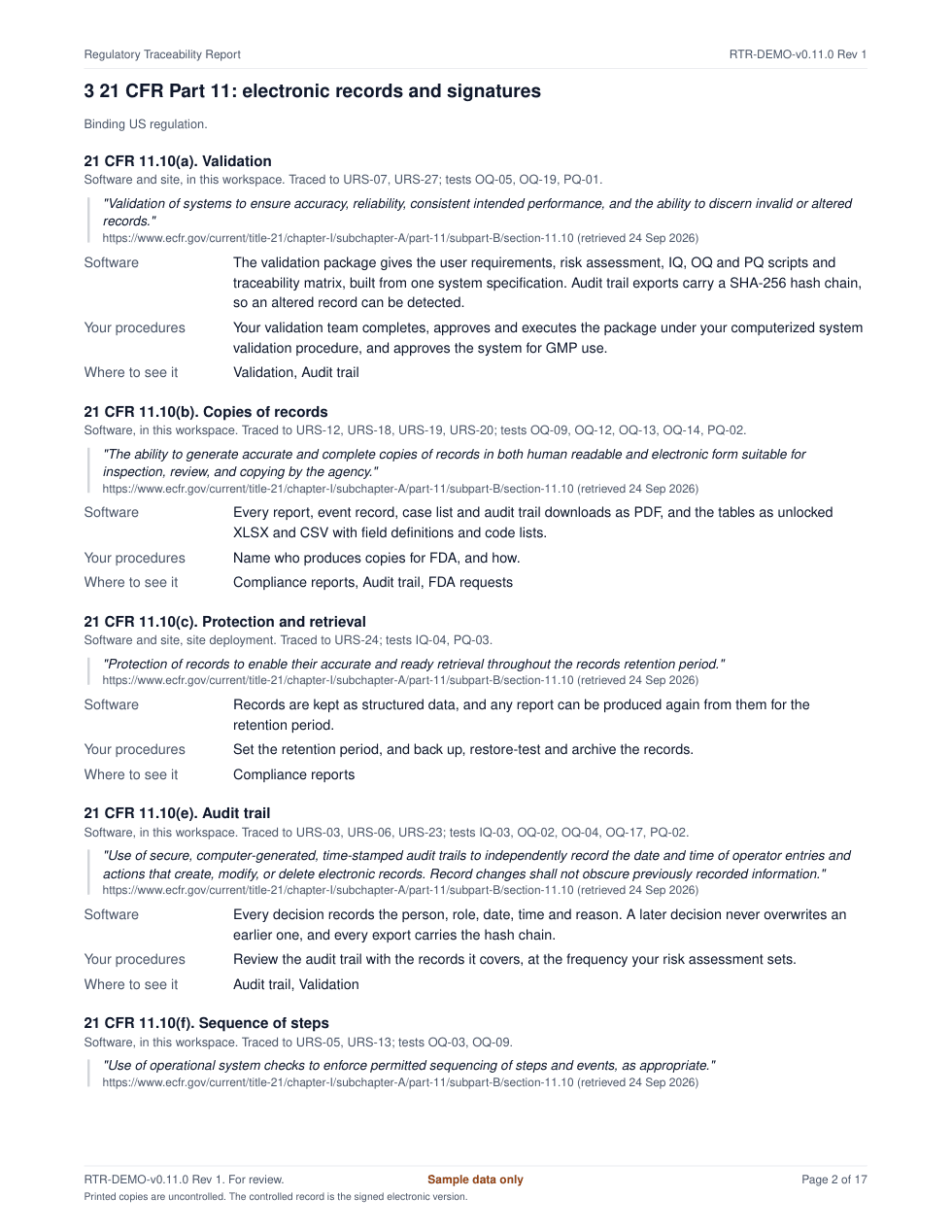
The same map, as a document
Hand your auditor the traceability report
Questions
Common questions
- What does Part 11 cover?
- Electronic records that FDA's other regulations require you to keep, and electronic signatures on them. FDA's 2003 guidance on the scope and application of Part 11 explains how the agency applies it.
- Can software be Part 11 compliant on its own?
- No. Part 11 applies to the company that keeps the records. Software provides controls such as audit trails, signature details and authority checks; your validation, procedures and training complete them, and your quality unit decides.
- Which requirements need the installation at our site?
- 21 CFR 11.10(c) (protection and retrieval); 21 CFR 11.100(a) (unique signatures); 21 CFR 11.200(a)(1) (signature components); 21 CFR 11.300(b) (password checks); 21 CFR 11.300(d) (unauthorized use). The demonstration workspace does not have these; a site deployment adds them.
- How is this page kept current?
- Each quote was checked word for word against the eCFR, most recently on 24 Sep 2026. The same map drives the regulatory traceability report in the validation package, so the page and the report always agree.
See it with sample data
We show the review queue, a signed monitoring report, the audit trail review and the validation package, then answer your team's questions.