Monitoring
Aseptic behavior monitoring
Cameras check the behaviors your procedures prohibit, such as fast movement near open product or skipped glove disinfection. Each detection becomes a case, and a trained reviewer decides it.
Why it matters
Regulators ask you to watch how operators work
“Aseptic operations (including APS) should be observed on a regular basis by personnel with specific expertise in aseptic processing to verify the correct performance of operations including operator behaviour in the cleanroom and address inappropriate practices if detected.”
“Supervisory personnel should routinely evaluate each operator’s conformance to written procedures during actual operations. Similarly, the quality control unit should provide regular oversight of adherence to established, written procedures and aseptic technique during manufacturing operations.”
“To ensure maintenance of product sterility, it is critical for operators involved in aseptic activities to use aseptic technique at all times.”
“Movement of personnel should be slow, controlled and methodical to avoid excessive shedding of particles and organisms due to over-vigorous activity.”
What it watches
Written rules, each traced to its sources
C1 Moving too fast in the filling room
Example rule R-01 v1.0: Operators in the filling room walk at or below 0.5 m/s, measured over any 2-second stretch.
Measurement. Tracks each person and measures walking pace against the floor calibration.
C2 Components loaded incorrectly at the infeed
Example rule R-02 v1.0: Containers and closures are loaded as the line setup procedure shows: each component seated in its nest, trays level, and no touch on product-contact surfaces.
Trained detector. Checks how each component is placed and handled at the infeed.
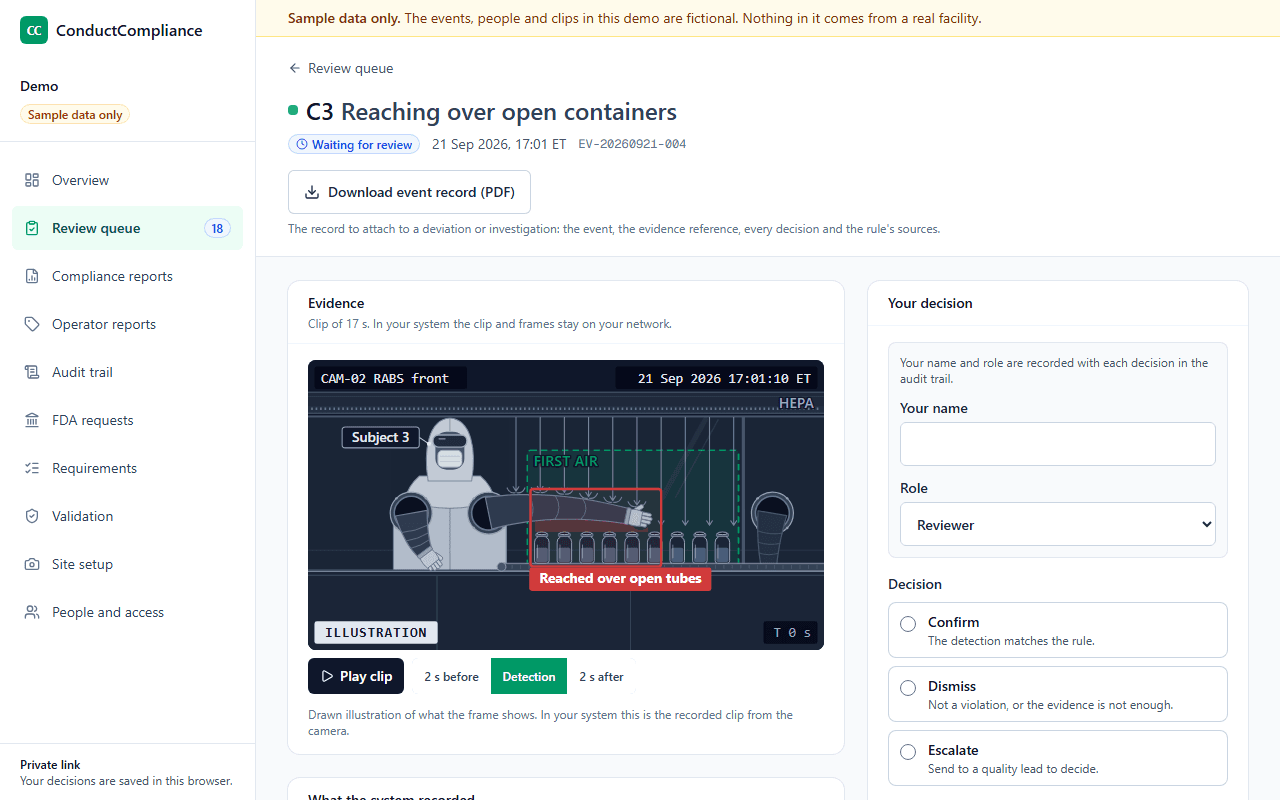
C3 Reaching over open containers
Example rule R-03 v1.0: No hand, glove or arm passes above open containers, including through the RABS glove ports. Manipulations approach from the side.
Trained detector. Tracks arms and gloves against the zone above open containers.
C4 Gloves not disinfected before sterile handling or between glove ports
Example rule R-04 v1.0: Gloves are disinfected before handling sterile supplies and between uses of the RABS gauntlet gloves.
Sequence check. Looks for glove disinfection between glove port use and sterile handling.
C5 Component bag touching the hopper
Example rule R-05 v1.0: Component bags do not touch the component hopper while it is loaded.
Trained detector. Detects contact between a component bag and the hopper.
C6 Gowning step missed or out of order
Example rule R-06 v1.0: Each gowning step is done, in the order the gowning procedure sets.
Sequence check. Follows each gowning step and its order against the gowning procedure.
How it works
From detection to record
The detector opens a case
Each case gets an ID, the time from the site clock, the camera, the rule and its version, and the detector version.
A reviewer decides
Confirm, dismiss or escalate, with a reason from a fixed list. Every decision records the person, role, date and time.
A quality lead closes escalations
With the outcome, and the deviation or CAPA number when one is raised. Reviewers cannot close them.
Reports add it all up
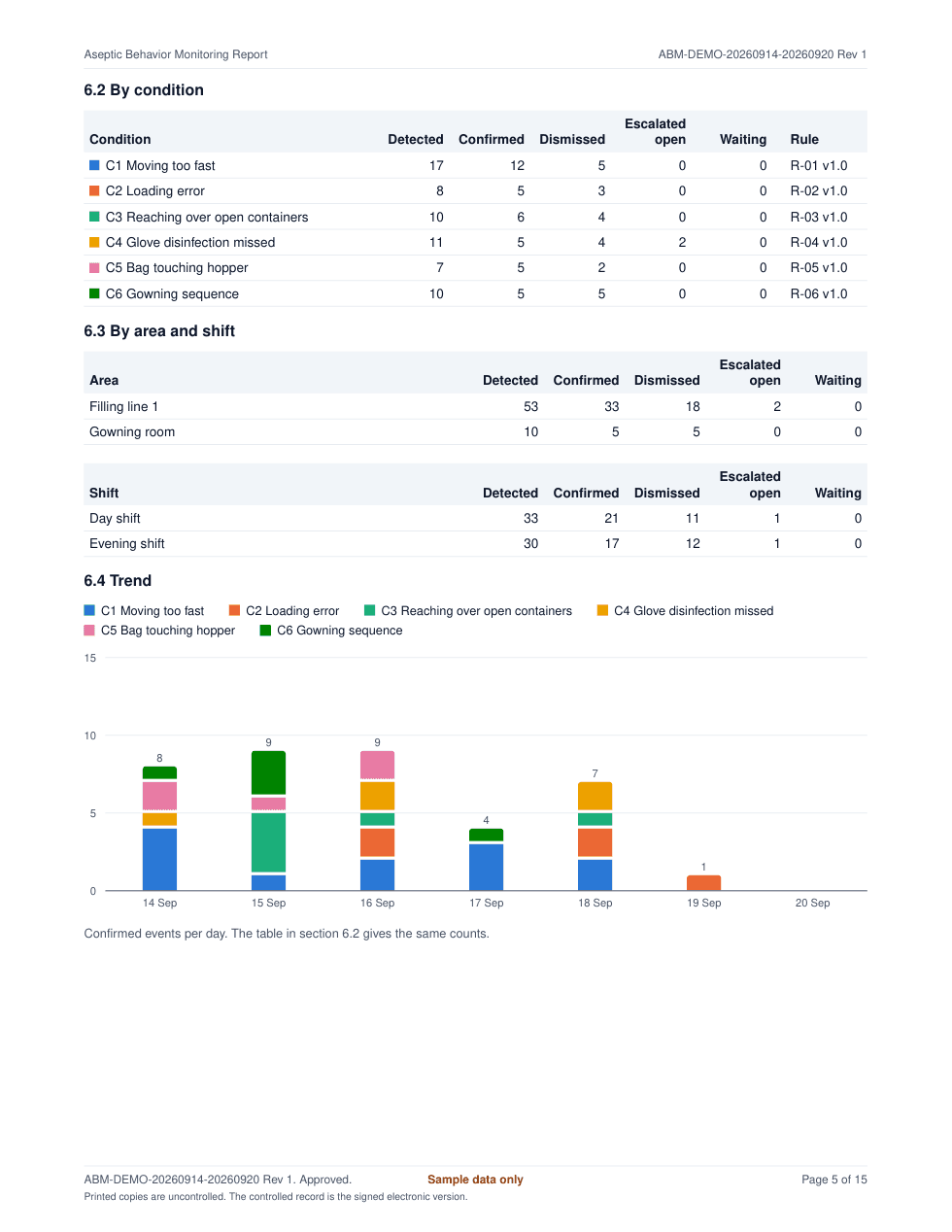
For any week or month: detected equals confirmed, dismissed, open escalations and waiting cases.
Who does what
The software flags. People decide.
The software
- Checks each camera view against written, versioned rules
- Opens a case with the time, camera, rule and clip reference
- Records every decision with the person, role, time and reason
- Counts every case in controlled reports and unlocked exports
Your team
- Writes the rules in your procedures and approves them
- Reviews every case and decides it
- Investigates escalations under your deviation procedure
- Coaches operators from the cases and signs the reports
Operator privacy
Operators stay anonymous
What it produces
Records your quality unit can use
Aseptic Behavior Monitoring Report
PDFXLSXCSVCounts by condition, area and shift, a daily trend, every escalation with its outcome, the audit trail, and review and approval signatures.
Event record
PDFOne case with its evidence reference, the rule and its sources, and every decision: the record to attach to a deviation.
Operator reports
On screenEvents for each operator label, by camera and shift, with clips, for coaching without names.
Audit trail
PDFXLSXCSVEvery decision in order, with a SHA-256 hash chain on every export.
Beyond aseptic technique
The same system for other GMP practices
Questions
Common questions
- Which behaviors can it watch?
- The demo watches six: pace near the filling line, how components are loaded, reaching over open containers, glove disinfection between glove ports, component bags touching the hopper, and gowning order. Each rule is written from your own procedures at setup.
- Does it replace expert observation or environmental monitoring?
- No. Annex 1 asks for regular observation by people with aseptic expertise, and your environmental monitoring stays as it is. Camera monitoring adds a continuous record of behavior for your team to review.
- What happens when a detection is wrong?
- The reviewer dismisses it with a reason, such as the camera view not showing enough or the wrong person detected. Dismissals stay in the audit trail and in the reports, so the counts always add up.
- Are operators named in the records?
- No. Operators appear as labels such as Subject 8. A label holds within one camera and one shift, and the system keeps no link from a label to a name and builds no face templates.
- Where does the video go?
- It stays on your network. Each case cites its clip by ID, and your team can show the clip on screen or provide a copy when an investigator asks.
See it with sample data
We show the review queue, a signed monitoring report, the audit trail review and the validation package, then answer your team's questions.