Records
An audit trail you can check yourself
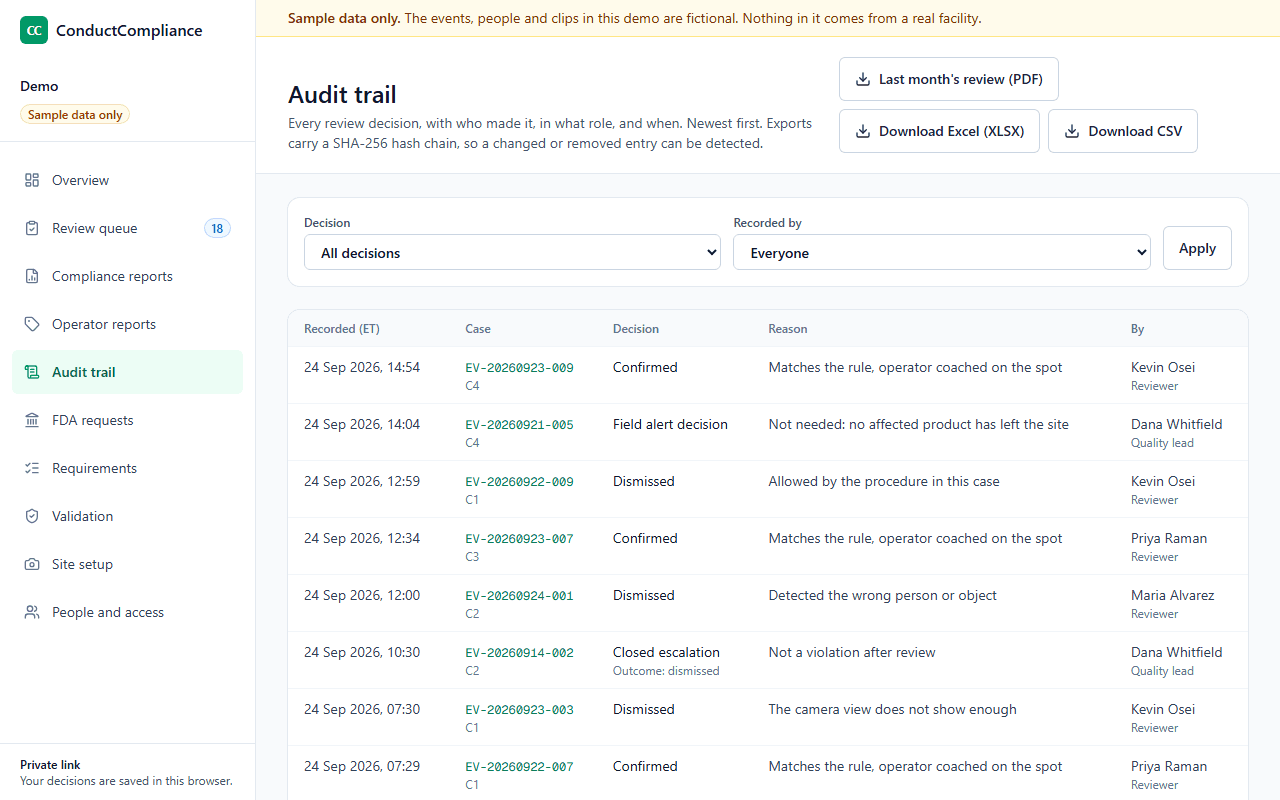
Every decision is recorded with who made it, in what role, when and why, and nothing overwrites it. Exports carry a SHA-256 hash chain, so a changed or missing entry shows up.
Why it matters
Audit trails that record, and get reviewed
“Use of secure, computer-generated, time-stamped audit trails to independently record the date and time of operator entries and actions that create, modify, or delete electronic records. Record changes shall not obscure previously recorded information.”
“Consideration should be given, based on a risk assessment, to building into the system the creation of a record of all GMP-relevant changes and deletions (a system generated "audit trail"). For change or deletion of GMP-relevant data the reason should be documented. Audit trails need to be available and convertible to a generally intelligible form and regularly reviewed.”
“Personnel responsible for record review under CGMP should review the audit trails that capture changes to data associated with the record as they review the rest of the record”
What each entry holds
Who did what, when, and why
- When
- Date and time from the site clock, with the time zone
- What
- The case, the decision and its outcome
- Why
- The reason from a fixed list, and any note
- Who
- The person and their role at the time
- Links
- The deviation or CAPA number, or the Field Alert Report reference
- Escalations
- The reviewer's answer on whether product could have left the site
Later decisions add entries; they never change earlier ones. Exports come as PDF, unlocked Excel and CSV, with field definitions and code lists.
A check anyone can run
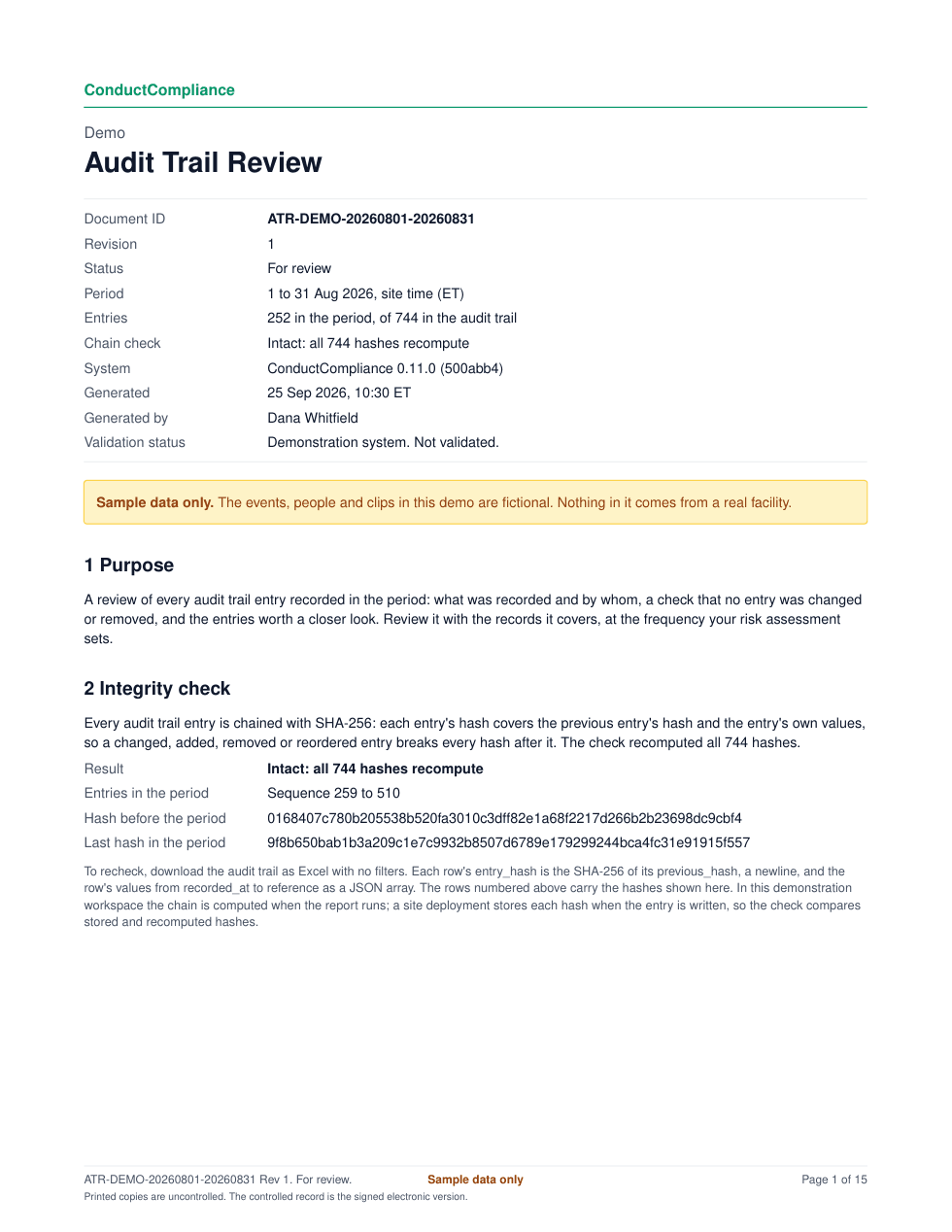
A SHA-256 hash chain on every export
Oldest first
Rows are listed in the order they were recorded, each with its sequence number.
Chain each row
Each row's hash is the SHA-256 of the previous row's hash, a line break, and the row's values as a JSON array.
Start from zeros
The first row starts from a previous hash of 64 zeros.
Spot any change
Change, add, remove or reorder one row, and every hash after it stops matching.
Audit trail review
A review report for any period
The exception checks
- Recorded outside production shifts
- Escalation closed by the person who escalated it
- Recorded without a named role
- First decision more than 3 days after detection
- Field alert checks decided after the due date, or still open past it
An exception is a prompt to check, not a finding. The review comes as PDF and Excel.
“If the review frequency for the data is not specified in CGMP regulations, you should determine the review frequency for the audit trail using knowledge of your processes and risk assessment tools.”
Who does what
The software records. Your team reviews.
The software
- Records every decision with the person, role, time and reason
- Keeps earlier entries unchanged
- Chains every export with SHA-256
- Builds the review report with the chain check and exceptions
Your team
- Sets the review frequency from your risk assessment
- Reviews the audit trail with the records it covers
- Follows up on exceptions
- Signs the review
Questions
Common questions
- How often should we review the audit trail?
- Your risk assessment sets it. FDA's data integrity guidance says to base the frequency on your knowledge of the process and your risk assessment. The validation package proposes a starting point: review each case's history with the case, the period's entries with each monitoring report, and the full trail each month.
- Can an entry be edited or deleted?
- No. Decisions add entries. A later decision, such as closing an escalation, is a new entry, and the earlier one stays exactly as it was.
- What if we export a filtered view?
- Each export chains the rows it contains. For a full check, export with no filters. The audit trail review report chains the whole trail, so its sequence numbers and hashes match that export row for row.
- Are the hashes stored, or computed?
- In the demonstration workspace the chain is computed when you export or run a review. In a site deployment each hash is stored when the entry is written, so the check compares stored hashes with fresh ones.
See it with sample data
We show the review queue, a signed monitoring report, the audit trail review and the validation package, then answer your team's questions.